
✅ New Employee Checklist
To-Do Once You Receive Your NBOE Credentials. Issues with credentials? Contact the NBOE IT Help Desk at ithelpdesk@nps.k12.nj.us or call "8700" at 973-733-8700.
☐ Download Microsoft Authenticator
☐ Download Duo Mobile
☐ Enroll in Password Management
☐ Log into Employee Self-Service (ESS)
☐ Review your Personal Details
☐ Identify your Pension Number
☐ Enroll in Benefits
☐ Check your pay stub every payday
☐ Review UKG Ready
☐ Review AESOP
☐ Bookmark the Curriculum Website and PowerTeacher Guide
☐ Get to know your NTU Building Rep
☐ Check out the NTU Updates every Friday to stay informed (Must be an active member to receive updates)
👇 Scroll down for more extensive information, links, and helpful resources.
Newark Public Schools Quick Access Guide
🖥️ Employee Self-Service (ESS)
Note: If you are outside of a school building, you must have Duo Mobile installed on your phone to access Employee Self-Service.
Use ESS to access:
- 💼 Career Opportunities
- ❤️ NBOE Benefits Information
- 💰 Bi-Weekly Pay Stubs (available every other Friday on payday)
- 📊 Compensation History
- 📝 W-4 Tax Form
- 📄 W-2 Forms (typically available the last week of January)
- 👤 Personal Information & Employment Changes
- 🏦 Escrow Enrollment & Updates (10% deducted to provide summer pay)
- 📑 1095-C Tax Form
- 🏛️ Pension Number (located under Personal Details)
Reminder: Check your pay stub every payday to verify your salary, deductions, and leave balances.
Review the Pay Stub/ Pay Check guide here.
🔐 Required Security Apps
Microsoft Authenticator
Click for instructions here.
Required to access:
- District Email
- Benefits Enrollment Website
- Other district systems while off-site
Duo Mobile
Required to access:
- Employee Self-Service (ESS) outside of district buildings
Password Management
✔ Enroll in New Enrollment for Password Management as soon as you receive your district credentials.
Issues with district technology, credentials, or security enrollment? Contact the NBOE IT Help Desk at ithelpdesk@nps.k12.nj.us or call "8700" at 973-733-8700.
💵 Payroll & Benefits
Payroll
- Review your pay stub every bi-weekly Friday through ESS.
- Payroll Website
- Payroll Questions:
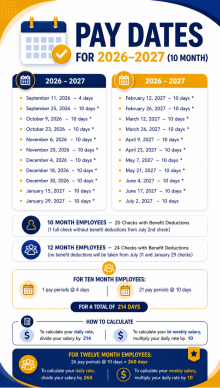
payrollcs@nps.k12.nj.us - 2026-2027 Pay Dates & Calculations
Benefits
- Enroll as soon as you receive your district credentials.
- Access requires Microsoft Authenticator when outside district buildings.
- Benefits Questions:
benefits@nps.k12.nj.us
Pension Information
Your pension deductions should begin within your first few months of employment.
If deductions do not begin immediately, the State will eventually deduct enough to cover your contributions retroactively from your start date.
You can locate your Pension Number in Employee Self-Service → Personal Details→ Additional Information.
Must register/ log in to state MBOS Pension account for further detail: https://my.nj.gov/aui/Login
Escrow Program
Escrow allows 10% of your pay to be withheld throughout the school year (October-May) and distributed during the summer months.
Open Enrollment:
📅 May 1 – September 15
(for both new and current employees)
📚 District Resources
- Curriculum Website
- PowerTeacher Guide
- UKG Ready (Kronos Timesheets) Click for the user guide here.
- AESOP (Request Sick/Personal Leave & Substitute Coverage)
- NBOE Human Resources Website
📁 NTU Resources
- NTU Updates
- NTU Building Representatives List (Building Reps are your first point of contact for union-related questions, concerns, and support. Take the opportunity to connect with and get to know your Building Representative within your school. If your school currently has a Building Rep vacancy, please review the contact information below to identify the appropriate union representative who can assist you with your union-related matters and school concerns.)
- Important Forms (FMLA, Policies, Donor Days, Missing Prep, Out of Certification Area forms, and more!)
- Rebuttals
- Evaluation Tips
- Professional Improvement Fund (PIF)
- Education Resource Center (ERC)
- NTU Connect & Upcoming Member Events
- NTU Education Foundation
- Scholarships for NTU members’ children, NBOE Paraprofessionals, and NBOE students of Newark
📧 Important Contacts
| Department | |
|---|---|
| NBOE Benefits | benefits@nps.k12.nj.us |
| NBOE Escrow/Salary | npscompensation@nps.k12.nj.us |
| NBOE Payroll | payrollcs@nps.k12.nj.us |
| NBOE Transcript/Earned Degree only for current employees | transcripts@nps.k12.nj.us |
| NBOE Leaves of Absence | leaveofabsence@nps.k12.nj.us |
| NBOE 504 ADA Accommodation | ada_accommodations@nps.k12.nj.us |
| NBOE IT Help Desk | ithelpdesk@nps.k12.nj.us |
| NBOE IT Help Desk Phone (Leave your phone number for a callback.) | 973-733-8700 |
| High School Union Issues | miovino@newarkteachersunion.com |
| Elementary Union Issues | mmaillaro@newarkteachersunion.com |
| Professional Improvement Fund (Conference & Tuition Reimbursement) | ntupif@gmail.com |
| Education Resource Center | erc@newarkteachersunion.com |
| NTU Connect | jtaylorloyas@newarkteachersunion.com |
| NTU Education Foundation | ntuedfoundation@gmail.com |
| NTU Office Phone (1019 Broad St. Newark, NJ 07102) | 973-643-8430 |